Delivery Route Planning Software: A Smarter Way to Manage Deliveries
Planning delivery routes can be challenging, especially when a business must coordinate many stops, changing traffic conditions, delivery windows, and driver schedules. Delivery route planning software helps organize this work by creating efficient routes and giving dispatchers and drivers better tools to manage the day. It can be useful for local businesses, retailers, wholesalers, field service teams, and delivery fleets of many sizes.
What Is Delivery Route Planning Software?
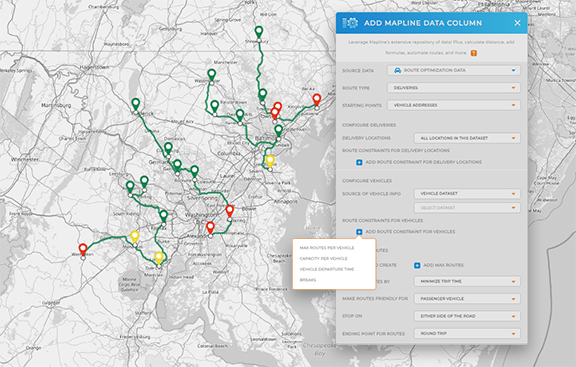
Delivery route planning software helps businesses plan and manage trips from a starting point to one or more delivery locations. Depending on the product, users can enter stops manually, import orders from other systems, or assign deliveries to drivers. The software then uses details such as distance, estimated travel time, vehicle capacity, and delivery time windows to recommend a route.
Some platforms focus on planning routes before drivers leave. Others also support dispatching, driver communication, delivery status updates, and proof of delivery. The available features vary, so it is important to match the software to the needs of the operation.
How Route Planning Software Works
A typical route-planning process begins with delivery information. This may include customer addresses, required delivery times, package sizes, vehicle limits, driver availability, and any special instructions. The software uses these details to arrange stops and assign them to vehicles.
During the day, some systems allow dispatchers to monitor route progress and respond to changes. If a new order comes in or a delay occurs, routes may be adjusted. Drivers may receive updated instructions through a mobile app, depending on the platform.
Key Benefits
- More efficient routes: Route recommendations can help reduce unnecessary driving and organize stops in a practical sequence.
- Time savings: Automating parts of route planning can reduce the time dispatchers spend arranging stops by hand.
- Improved delivery visibility: Dispatchers may be able to see route progress and identify delays sooner.
- Better customer communication: Some systems support delivery notifications and estimated arrival times, helping customers know when to expect an order.
- More consistent workflows: Shared route and delivery information can help teams follow the same process from dispatch through completion.
- Useful operational data: Reports may show route completion, delivery times, mileage, and other performance measures.
Results depend on the accuracy of the information entered, the software’s capabilities, and how well the system fits existing operations. Route planning tools can support better decisions, but they cannot eliminate every delay caused by traffic, weather, access restrictions, or customer availability.
Route Planning and Route Optimization
The terms “route planning” and “route optimization” are often used together. Route planning generally refers to arranging stops and creating a route. Route optimization usually means evaluating multiple possible routes and selecting one based on defined goals and constraints.
Those goals might include reducing total drive time, meeting delivery windows, limiting mileage, or balancing work across drivers. A business should check which objectives a platform supports and whether users can set priorities for different types of deliveries.
Features to Consider
Not every business needs the same tools. Before choosing software, consider the size and complexity of the delivery operation. Common features to review include:
- Multi-stop routing: The ability to plan routes with many delivery locations.
- Time-window scheduling: Support for deliveries that must arrive during specific hours.
- Vehicle and driver constraints: Options for accounting for vehicle capacity, shift length, or driver availability.
- Live route updates: Tools for adjusting routes when conditions or schedules change.
- Mobile access: A driver app or mobile-friendly interface for viewing stops and recording delivery progress.
- Proof of delivery: Options such as delivery notes, photos, signatures, or status confirmations.
- Customer notifications: Messages about delivery status or estimated arrival times.
- Integrations: Connections to order management, inventory, ecommerce, or fleet systems.
- Reporting: Data that helps managers review performance and identify opportunities to improve.
How to Choose the Right Solution
Start by documenting how deliveries are planned today. Identify recurring challenges, such as too much manual scheduling, limited visibility, missed delivery windows, or difficulty managing last-minute changes. Clear goals make it easier to compare software based on practical needs rather than a long list of features.
Next, consider the number of daily stops, the size of the fleet, the service area, and the complexity of delivery requirements. Ask whether the software can handle the expected workload and whether it works with the systems already in use. A trial or demonstration can help evaluate ease of use for both dispatchers and drivers.
It is also useful to review pricing, customer support, data security, and how the provider handles updates. Confirm what is included in the price, such as the number of users, vehicles, or planned routes, and whether additional fees apply.
Tips for a Successful Rollout
- Clean up delivery data. Check addresses, contact details, delivery instructions, and time windows before importing information.
- Set clear priorities. Decide whether the operation values faster delivery, lower mileage, balanced workloads, or another goal most.
- Begin with a pilot. Test the software with a small group of routes before expanding to the full fleet.
- Train dispatchers and drivers. Make sure everyone understands how routes are assigned, updated, and completed.
- Review results regularly. Compare performance against the goals established before implementation and adjust processes as needed.
Conclusion
Delivery route planning software can help businesses organize stops, coordinate drivers, and respond to changes more effectively. The right solution depends on the operation’s size, delivery requirements, existing technology, and priorities. By evaluating essential features, preparing accurate data, and introducing the system carefully, businesses can build a more organized delivery process and make better use of their time and resources.
5 Essential Tips for Choosing the Best Delivery Route Planning Software
- Choose software that optimizes routes with live traffic data.
- Check that it supports delivery time windows and vehicle limits.
- Use GPS tracking to monitor drivers and update customers.
- Review route reports to spot delays and reduce costs.
- Pick a tool that integrates with your dispatch and order systems.
Choose software that optimizes routes with live traffic data.
Choose delivery route planning software that uses live traffic data to help drivers avoid congestion, road closures, and unexpected delays. By adjusting routes as conditions change, the software can help keep delivery schedules on track, improve estimated arrival times, and reduce unnecessary driving. Before choosing a platform, check how often its traffic information updates and whether dispatchers and drivers receive route changes in real time.
Check that it supports delivery time windows and vehicle limits.
Before choosing delivery route planning software, make sure it can account for delivery time windows and vehicle limits. Time-window support helps schedule each stop within the customer’s requested hours, while vehicle constraints—such as weight, capacity, or vehicle type—help ensure each route is practical and safe. Checking for both can prevent unrealistic schedules, overloaded vehicles, and avoidable delivery delays.
Use GPS tracking to monitor drivers and update customers.
Use GPS tracking to monitor drivers’ progress throughout the day and respond quickly when routes change or delays occur. Real-time location updates can help dispatchers adjust plans, provide support, and share more accurate arrival estimates with customers. Keeping customers informed about delivery status can improve communication, set realistic expectations, and make the delivery experience smoother.
Review route reports to spot delays and reduce costs.
Review route reports regularly to identify patterns that may be slowing deliveries or driving up expenses. Look for recurring delays, excessive mileage, long stop times, and routes that consistently run behind schedule. Use these insights to adjust stop sequences, delivery windows, staffing, or dispatch procedures. Over time, small, data-informed changes can help improve on-time performance and control fuel and labor costs.
Pick a tool that integrates with your dispatch and order systems.
Choose delivery route planning software that integrates with your dispatch and order systems so information can move smoothly between teams. When orders, addresses, delivery windows, and driver assignments sync automatically, dispatchers spend less time entering data and are less likely to make errors. Integration also helps keep routes up to date when orders change, making it easier to coordinate deliveries and provide accurate updates to drivers and customers.