Best Semi Truck GPS: What to Look For in a Truck Navigation System
The best semi truck GPS is one that routes you according to your truck’s size, weight, and cargo—not just the fastest route for a passenger car. For professional drivers, truck-aware navigation can help identify potential restrictions, plan stops, and make long trips easier to manage. The right choice depends on your rig, routes, budget, and preferred features.
What Makes a GPS Suitable for Semi Trucks?
A standard car GPS may send a semi truck onto roads with low bridges, weight limits, tight turns, or other restrictions. A truck-specific GPS is designed to account for commercial vehicle information and provide routes intended for larger vehicles.
Before choosing a device, check that it supports the details relevant to your work, such as:
- Vehicle dimensions: Height, width, and length can affect which roads and structures are safe to use.
- Weight: Gross vehicle weight and axle information may be important for route restrictions.
- Hazardous materials: Drivers carrying regulated materials may need routing that accounts for applicable restrictions.
- Trailer configuration: Some systems let you save vehicle profiles for different trucks or setups.
Always enter vehicle information carefully and confirm that the GPS supports the restrictions that apply to your route and cargo.
Features to Compare
Truck-Specific Routing
Look for routing designed for commercial vehicles, with settings for truck dimensions and restrictions. The system should make it straightforward to update vehicle details when you change trucks, trailers, or loads.
Current Maps and Updates
Road layouts, construction zones, and restrictions change. Check how often map updates are provided, whether they are included or require a fee, and how easy they are to install. Live traffic information can also help you respond to congestion, though it should not override truck restrictions or road signs.
Clear, Early Guidance
A large, easy-to-read display and timely lane guidance can be helpful when navigating unfamiliar interchanges. Consider screen size, brightness, voice directions, and whether the interface is simple to use while parked and planning a route.
Truck-Stop and Parking Information
Drivers may want points of interest such as truck stops, fuel locations, rest areas, repair services, and parking. Check whether listings include useful details and how recently they are updated. Availability can change, so confirm parking or services directly when the stop is important.
Offline Navigation
Coverage can be unreliable in some areas. A dedicated GPS with stored maps may continue navigating without a cellular connection. If you use a phone or tablet, check whether maps can be downloaded for offline use and whether the device remains usable without data service.
Mounting and Power
Choose a device that can be mounted securely without blocking your view or interfering with vehicle controls. Consider power options, cable routing, screen glare, and whether the GPS can be repositioned between vehicles.
Dedicated GPS or Phone App?
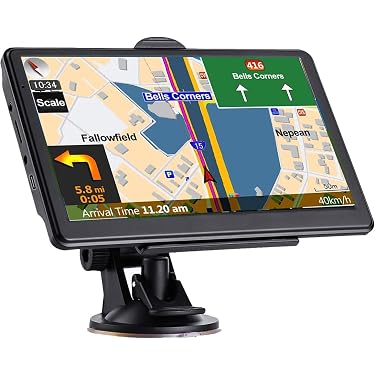
A dedicated truck GPS may offer a larger display, built-in navigation, and truck-specific settings in a purpose-designed device. A phone app can be more affordable and convenient, especially if you already carry a suitable phone or tablet. However, app features, map access, and truck-routing capabilities vary. Compare the exact specifications rather than assuming every navigation app supports commercial vehicle restrictions.
Some drivers use a dedicated GPS alongside a phone for traffic or other information. If using more than one navigation source, avoid making sudden maneuvers based on conflicting directions. Pull over safely to review the route when needed.
How to Choose the Best Semi Truck GPS for Your Needs
- List your requirements. Note your truck and trailer dimensions, typical cargo, routes, and must-have features.
- Check routing capabilities. Confirm that the device supports the vehicle profile and restrictions relevant to your operation.
- Compare map and traffic services. Review update frequency, coverage, subscriptions, and offline access.
- Try the interface if possible. Make sure the screen, controls, and voice directions are comfortable for your use.
- Review total cost. Include the device, maps, subscriptions, mounts, and any update fees.
- Read recent owner feedback. Look for comments about routing, updates, reliability, and customer support.
Use GPS as a Planning Aid
No GPS can guarantee that every suggested road is appropriate for every truck or load. Follow posted signs, applicable regulations, company procedures, and directions from authorized officials. Check clearances and restrictions using reliable sources, and use your judgment when conditions differ from what the device shows. Route planning should be done before driving, and adjustments should be made only when it is safe to do so.
Final Thoughts
The best semi truck GPS combines truck-aware routing, dependable maps, a readable display, and features suited to your day-to-day work. Compare devices and apps against your vehicle profile, routes, and budget. A well-chosen navigation system can support trip planning—but safe driving still depends on checking the route and staying attentive to road conditions.
Best GPS for Semi Trucks: 8 Frequently Asked Questions
- What is the best GPS for semi trucks?
- What features should I look for in a semi truck GPS?
- How does truck GPS navigation differ from regular car GPS?
- Can a semi truck GPS route around low bridges and weight restrictions?
- Are truck GPS devices better than navigation apps for semi truck drivers?
- Do semi truck GPS devices provide real-time traffic and road updates?
- Can I use a semi truck GPS without cellular service?
- How much does a good semi truck GPS cost?
What is the best GPS for semi trucks?
The best GPS for semi trucks is one that supports truck-specific routing based on your vehicle’s height, length, width, weight, and cargo restrictions. Look for current maps, clear turn-by-turn directions, traffic updates, and useful points of interest such as truck stops and parking. The right choice depends on your routes and needs, so compare features, update costs, and recent user reviews—and always follow posted signs and verify restrictions, since no GPS can guarantee every route is suitable for your rig.
What features should I look for in a semi truck GPS?
When choosing a semi truck GPS, look for truck-specific routing that accounts for your vehicle’s height, weight, length, width, and applicable road restrictions. Helpful features include up-to-date maps, traffic information, clear lane guidance, voice directions, and points of interest such as truck stops, fuel stations, and rest areas. Offline navigation, an easy-to-read display, reliable mounting, and simple vehicle-profile settings can also make the device more practical on the road. Compare map-update costs and subscription requirements, and remember to follow road signs and verify restrictions—GPS directions are a planning aid, not a substitute for driver judgment.
How does truck GPS navigation differ from regular car GPS?
Truck GPS navigation is designed for the size, weight, and requirements of commercial vehicles, while regular car GPS generally routes for passenger vehicles. Truck navigation can use details such as height, length, weight, and cargo restrictions to help avoid roads with low bridges, weight limits, or other unsuitable conditions. It may also include truck-focused information, such as fuel stops, rest areas, and truck parking. Because map data and restrictions can change, drivers should verify routes, follow posted signs, and use the GPS as a planning aid rather than a substitute for safe judgment.
Can a semi truck GPS route around low bridges and weight restrictions?
Yes, a semi truck GPS can help route around low bridges, weight limits, and other truck restrictions when you enter your vehicle’s correct height, weight, length, and other required details. Its routing depends on accurate map data, which may not reflect every recent change, so always follow posted signs and verify critical clearances and restrictions with reliable sources.
Are truck GPS devices better than navigation apps for semi truck drivers?
Truck GPS devices can be a better fit for semi truck drivers who want a dedicated screen, truck-specific routing, and navigation that may work without a cellular connection. Navigation apps can be more affordable and convenient to update, but their truck-routing features and coverage vary. The best choice depends on your vehicle, routes, and preferences; compare support for truck dimensions and restrictions, map updates, offline use, and total cost. Neither option replaces checking road signs, clearances, and current conditions.
Do semi truck GPS devices provide real-time traffic and road updates?
Yes, many semi truck GPS devices provide real-time traffic and road updates, such as congestion, construction, closures, and detours. These features may require a cellular connection, a paired smartphone, or a paid subscription, so check how each device receives updates and whether coverage is available on your routes. Traffic information can help with trip planning, but always follow posted signs and verify that any suggested detour is suitable for your truck’s dimensions, weight, and cargo restrictions.
Can I use a semi truck GPS without cellular service?
Yes, you can use many semi truck GPS devices without cellular service, as long as the maps are stored on the device or downloaded in advance. Turn-by-turn navigation and truck-specific routing may work offline, but features such as live traffic, road-condition updates, and online search typically require an internet connection. Before your trip, download available maps, confirm your truck profile is saved, and check whether the GPS needs occasional connectivity for updates.
How much does a good semi truck GPS cost?
A good semi truck GPS typically costs about $200 to $500 for a dedicated device, with premium models priced higher depending on screen size, truck-routing features, and included services. Smartphone apps may cost less upfront, but some require subscriptions for truck-specific routing, live traffic, or map updates. When comparing options, check the total cost—including updates, subscriptions, mounting accessories, and any additional features—rather than looking only at the purchase price.