Garmin 7-Inch GPS: A Practical Guide for Drivers
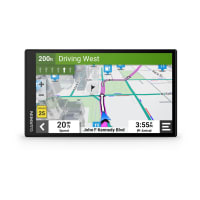
A Garmin 7-inch GPS offers a larger screen for viewing maps, directions, and points of interest while driving. Compared with a compact navigator, the bigger display can make routes easier to read at a glance, especially in larger vehicles or for drivers who prefer more on-screen detail. Garmin offers several navigation devices with screens in this size range, and features vary by model.
What a 7-Inch Garmin GPS Can Offer
Many Garmin automotive GPS units include turn-by-turn directions, spoken street names, lane guidance, and route planning. Depending on the model, you may also find driver alerts, nearby points of interest, hands-free calling, voice control, or access to live traffic and weather information through a compatible smartphone connection.
Map coverage and update options differ across devices. Before buying, check whether the model includes maps for the areas where you drive and how map updates are provided. Connected features may require a smartphone, a Garmin app, a data connection, or a separate service.
Benefits of a Larger Navigation Screen
- Clearer route viewing: A larger display can make upcoming turns and route information easier to see.
- More room for map details: The screen may show a wider view of the route and surrounding roads.
- Convenient for larger vehicles: Drivers of trucks, vans, and RVs may appreciate a screen that is easier to view from farther away.
- Simple destination entry: A larger touchscreen can provide more space for menus and on-screen controls.
A larger display still needs to be positioned safely. Mount the device where it does not block your view of the road, and set your destination before you begin driving.
Choosing the Right Garmin 7-Inch GPS
Start by considering how and where you travel. A device intended for everyday car use may have different routing tools from a model designed for RVs or commercial vehicles. Specialized units may let you enter vehicle dimensions or weight to help plan routes, but availability and capabilities depend on the specific product.
Compare these features before making a decision:
- Vehicle compatibility: Choose a device designed for your type of vehicle and travel.
- Map coverage: Confirm which countries or regions are included.
- Updates: Review how map and software updates work.
- Traffic services: Check whether traffic information is included, connected, or subscription-based.
- Mounting and power: Make sure the mount and power cable suit your vehicle.
- Connectivity: Look for Bluetooth, smartphone integration, or other features you plan to use.
Garmin GPS vs. Smartphone Navigation
Phone apps can be convenient, but a dedicated GPS navigator may be useful for drivers who prefer a separate navigation screen. It can also help keep directions visible without relying on a phone mounted for navigation. However, smartphones may offer familiar apps and connected services. The better option depends on your driving habits, preferred features, and whether you want navigation to work independently of your phone.
Tips for Getting the Most from Your Device
Keep maps and software current, review route preferences, and check the device’s manual for model-specific instructions. Before a long trip, enter your destination and confirm the route while parked. If you use connected features, verify that your phone is paired and that the required app or data connection is available.
Is a Garmin 7-Inch GPS Right for You?
A Garmin 7-inch GPS may be a good fit if you want a dedicated navigator with a large, easy-to-view screen. The right model depends on your vehicle, travel needs, and the features you value most. Compare specifications carefully, since screen size alone does not determine map coverage, traffic options, routing tools, or connectivity.
6 Benefits of a Garmin 7-Inch GPS for Clearer, Easier Navigation
- Large screen makes directions easier to see.
- Clear maps help you follow routes at a glance.
- Touchscreen controls make destination entry convenient.
- Spoken turn-by-turn guidance helps keep your eyes on the road.
- Dedicated navigation keeps directions separate from your phone.
- Some models offer useful driver alerts and traffic features.
Garmin 7-Inch GPS Cons: Dashboard Space, Higher Cost, and Connectivity Requirements
- Can take up more dashboard space than a smaller GPS.
- May cost more than compact models.
- Some connected features require a compatible phone or service.
Large screen makes directions easier to see.
A Garmin 7-inch GPS has a large screen that makes directions easier to see at a glance. The spacious display can make upcoming turns, route information, and map details clearer, helping drivers follow directions without squinting at a smaller screen.
Clear maps help you follow routes at a glance.
A Garmin 7-inch GPS gives you a roomy display that makes maps and route guidance easier to see at a glance. Clear on-screen directions can help you spot upcoming turns, follow your route, and stay focused on the road—without having to study a small screen.
Touchscreen controls make destination entry convenient.
The Garmin 7-inch GPS touchscreen makes entering a destination convenient, with on-screen controls that are easy to see and use. You can tap through menus, search for an address or point of interest, and review your selection on the larger display before starting your route.
Spoken turn-by-turn guidance helps keep your eyes on the road.
Spoken turn-by-turn guidance helps you follow your route without constantly looking at the screen. Clear voice prompts announce upcoming turns and other navigation details, so you can keep your attention on the road while still knowing where to go.
Dedicated navigation keeps directions separate from your phone.
A Garmin 7-inch GPS keeps navigation on a dedicated screen, separate from your phone. That means directions remain easy to view while your phone is free for calls, messages, or music. It can also reduce your reliance on a phone’s battery and help keep your navigation setup consistent from trip to trip.
Some models offer useful driver alerts and traffic features.
Some Garmin 7-inch GPS models offer helpful driver alerts and traffic features to make trips more informed and convenient. Depending on the model and available connections, alerts may provide warnings about road conditions or upcoming changes, while traffic information can help you spot delays and consider alternate routes. Feature availability varies, so check the device specifications before choosing a model.
Can take up more dashboard space than a smaller GPS.
A 7-inch Garmin GPS offers a large, easy-to-read display, but its size can take up more dashboard space than a smaller navigator. This may make it harder to find a convenient mounting spot, especially in a compact car or a vehicle with a crowded dashboard. Before buying, check the device’s dimensions and consider where it can be mounted without blocking your view or interfering with other controls.
May cost more than compact models.
One potential drawback of a Garmin 7-inch GPS is its price: models with larger screens may cost more than compact navigators. If you mainly need basic directions, the extra expense may not be worthwhile, so compare features and prices to find a device that fits your needs and budget.
Some connected features require a compatible phone or service.
One drawback of some Garmin 7-inch GPS models is that connected features may depend on a compatible smartphone, app, data connection, or paid service. Without the required setup, features such as live traffic, weather updates, or hands-free calling may be limited or unavailable. Check the device’s requirements before buying, especially if you plan to rely on these features during your trips.