GPS Units: A Practical Guide to Choosing the Right Device
GPS units use signals from satellites to help determine a location and guide people to a destination. They’re used in cars, trucks, boats, and outdoor activities, as well as in smartphones and other connected devices. A dedicated GPS unit can be useful when you want navigation features that are easy to view and operate while traveling.
How GPS Units Work
A GPS unit receives signals from multiple satellites and uses them to estimate its position. Navigation software combines that position with map data to show where you are, calculate a route, and provide directions. Depending on the device and its features, it may also display traffic information, points of interest, speed limits, or alternate routes.
Types of GPS Units
- Automotive GPS units: Designed for navigation in cars and other road vehicles. Common features include turn-by-turn directions, spoken guidance, and points of interest.
- Truck GPS units: Often include routing options that account for vehicle dimensions, weight, or road restrictions. Drivers should confirm that settings and map information are appropriate for their vehicle and route.
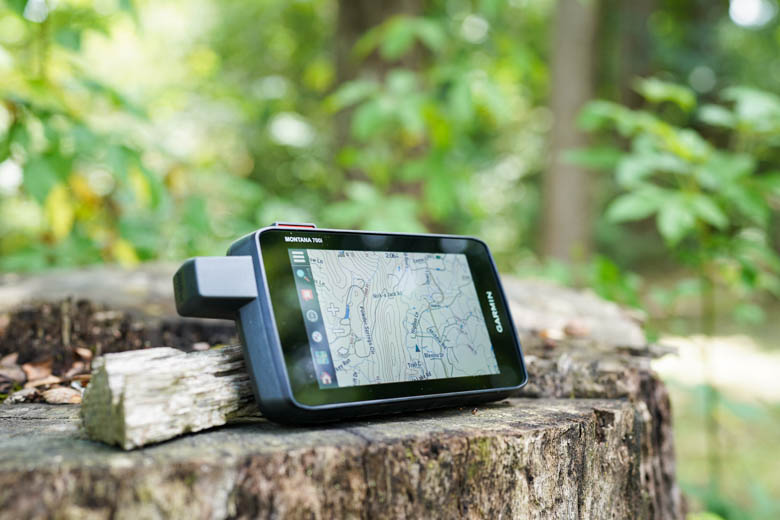
- Handheld GPS units: Built for outdoor use, such as hiking, camping, and geocaching. Some models include rugged construction, long battery life, and offline maps.
- Marine GPS units: Used on boats to show position and navigation information on the water. Features vary and may include chart support, route planning, or integration with other marine equipment.
- GPS devices in phones and wearables: Smartphones and smartwatches can provide location and navigation features, often using GPS alongside other positioning technologies.
Features to Consider
When comparing GPS units, think about where and how you’ll use the device. A large, readable screen can be helpful in a vehicle, while a compact, water-resistant design may suit outdoor activities. Other considerations include:
- Maps and updates: Check which maps are included and how updates are provided.
- Offline navigation: Downloaded maps can be useful in areas with limited or no cellular service.
- Traffic information: Some devices can show traffic conditions and suggest alternate routes; availability may depend on the model, service, and region.
- Mounting and power: Make sure the unit can be securely mounted and conveniently powered where you plan to use it.
- Ease of use: Clear menus, readable directions, and straightforward controls can make navigation less distracting.
- Durability: For outdoor or marine use, consider weather resistance and the conditions the device is designed to handle.
Dedicated GPS Unit or Smartphone?
A smartphone is convenient because navigation is already built in, and it can combine directions with other apps. However, phone navigation may rely on cellular data for certain features, and frequent use can drain the battery. A dedicated GPS unit may offer a larger screen, vehicle-specific features, or maps stored directly on the device. The right choice depends on your routes, vehicle, budget, and preference.
Getting the Most from a GPS Unit
Before a trip, install available map updates and review your route. Set the destination while parked, position the device where it can be seen without obstructing your view, and follow local traffic laws. GPS directions are helpful, but they should be used alongside road signs, current conditions, and sound judgment. If a route appears unsafe or unsuitable, choose a safer alternative.
Choosing with Confidence
The best GPS unit is one that fits your specific needs. Consider the places you travel, the type of vehicle or activity involved, and the features you’re likely to use. Comparing map support, screen design, durability, and update options can help you find a device that makes navigation more convenient and dependable.
9 Essential Tips for Mastering Units in Measurements
- Choose units that fit the scale of what you’re measuring.
- Include units with every measurement.
- Use one unit system consistently.
- Convert units before comparing values.
- Check whether a conversion needs multiplication or division.
- Keep track of squared and cubed units.
- Use a kitchen scale for more precise ingredient measurements.
- Label graph axes with units.
- Round only after completing calculations.
Choose units that fit the scale of what you’re measuring.
Choose units that fit the scale of what you’re measuring to make results easier to read, compare, and communicate. For example, use millimeters for small objects, meters for room dimensions, and kilometers for long distances. Selecting an appropriate unit avoids unwieldy numbers and helps prevent confusion.
Include units with every measurement.
Include units whenever you write a measurement so readers know exactly what the number means. For example, write “the screen is 6 inches wide” instead of “the screen is 6 wide,” or “the route is 25 miles” rather than “the route is 25.” Clear units make measurements easier to understand and compare.
Use one unit system consistently.
Use one unit system consistently throughout your document, product listing, or set of instructions. Mixing measurements—such as miles with kilometers or inches with centimeters—can confuse readers and lead to mistakes. Choose the system that best suits your audience, then use it for every relevant measurement.
Convert units before comparing values.
Convert units before comparing values to make sure you’re evaluating like with like. For example, convert miles to kilometers or ounces to grams before deciding which distance or weight is greater. Consistent units help prevent mistakes and make calculations and comparisons clearer.
Check whether a conversion needs multiplication or division.
Before converting units, check whether the new unit is larger or smaller than the original. When converting to a smaller unit, the numerical value usually increases, so you multiply; when converting to a larger unit, the value usually decreases, so you divide. For example, converting 3 feet to inches means multiplying by 12, while converting 36 inches to feet means dividing by 12. Keep the conversion factor and units visible in your calculation to help confirm that the result makes sense.
Keep track of squared and cubed units.
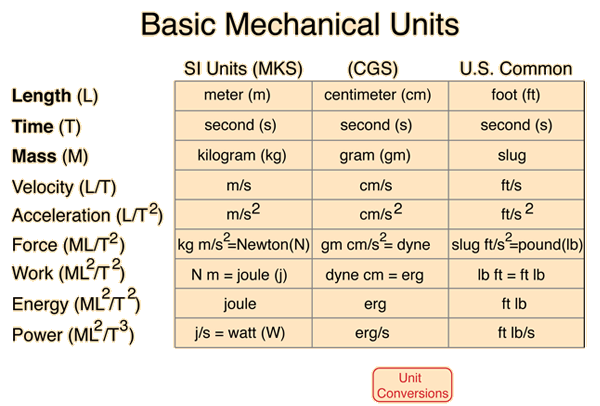
Keep track of squared and cubed units when calculating area and volume. Area is measured in square units, such as square feet (ft²), because it covers two dimensions; volume is measured in cubic units, such as cubic feet (ft³), because it covers three. Carry the units through each step of your calculation, and check that your final answer matches what you measured.
Use a kitchen scale for more precise ingredient measurements.
Use a kitchen scale for more precise ingredient measurements, especially when baking. Weighing ingredients is often more accurate than measuring by volume because the amount in a cup can vary depending on how an ingredient is packed or scooped. Place a bowl on the scale, tare it to zero, and add each ingredient to the desired weight for consistent results.
Label graph axes with units.
Labeling graph axes with units makes data easier to understand and compare. Include the appropriate unit beside each quantity—for example, “Time (seconds)” or “Distance (miles)”—so readers know what the numbers represent. Clear axis labels help prevent confusion, especially when values could refer to different measurements or scales.
Round only after completing calculations.
Round only after completing all calculations. Keeping extra digits during intermediate steps helps prevent small rounding errors from accumulating and affecting the final result. Once you’ve finished the calculation, round the answer to the appropriate number of decimal places or significant figures for the units and level of precision required.