Route Scheduling Software: A Smarter Way to Plan Daily Routes
Managing a schedule of stops can quickly become complicated. Businesses need to account for travel time, customer availability, vehicle capacity, employee workloads, and changing conditions on the road. Route scheduling software helps bring these details together, making it easier to plan efficient routes and keep daily operations organized.
What Is Route Scheduling Software?
Route scheduling software is a tool for planning when and where drivers, field technicians, delivery teams, or other mobile workers should go. It combines stop locations with scheduling requirements to create practical routes and schedules.
Depending on the platform, users may be able to enter stops manually, import orders from another system, or assign work automatically. The software can then arrange visits according to factors such as distance, time windows, service duration, and available resources.
How It Works
A route scheduling system typically starts with information about the day’s work. This may include addresses, appointment times, delivery deadlines, estimated service times, and details about vehicles or staff. The software uses these inputs to organize stops into routes and assign them to the appropriate drivers or teams.
Many tools also support updates during the day. If a job is added, canceled, or delayed, a dispatcher can revise the schedule and communicate the change to affected workers. Some platforms incorporate traffic or location information to help teams respond to changing conditions.
Key Benefits
More Efficient Routes
Planning stops manually can be time-consuming, especially when a schedule includes many locations. Route scheduling software can help reduce unnecessary backtracking and organize stops into a more logical sequence. Better-planned routes may help businesses make more visits with the resources they already have.
Improved Schedule Reliability
When travel time and service duration are considered together, schedules can be more realistic. This makes it easier to set customer expectations, arrive within appointment windows, and avoid overloading drivers or field teams.
Less Administrative Work
Automating routine planning tasks can reduce the time dispatchers spend creating and revising routes. Staff can focus more on exceptions, customer needs, and operational decisions rather than repeatedly arranging stops by hand.
Clearer Communication
Shared schedules can help dispatchers and mobile workers stay aligned. Depending on the software, drivers may receive stop details, directions, schedule changes, and job notes through a mobile app. This can reduce confusion and limit the need for repeated phone calls.
Greater Visibility
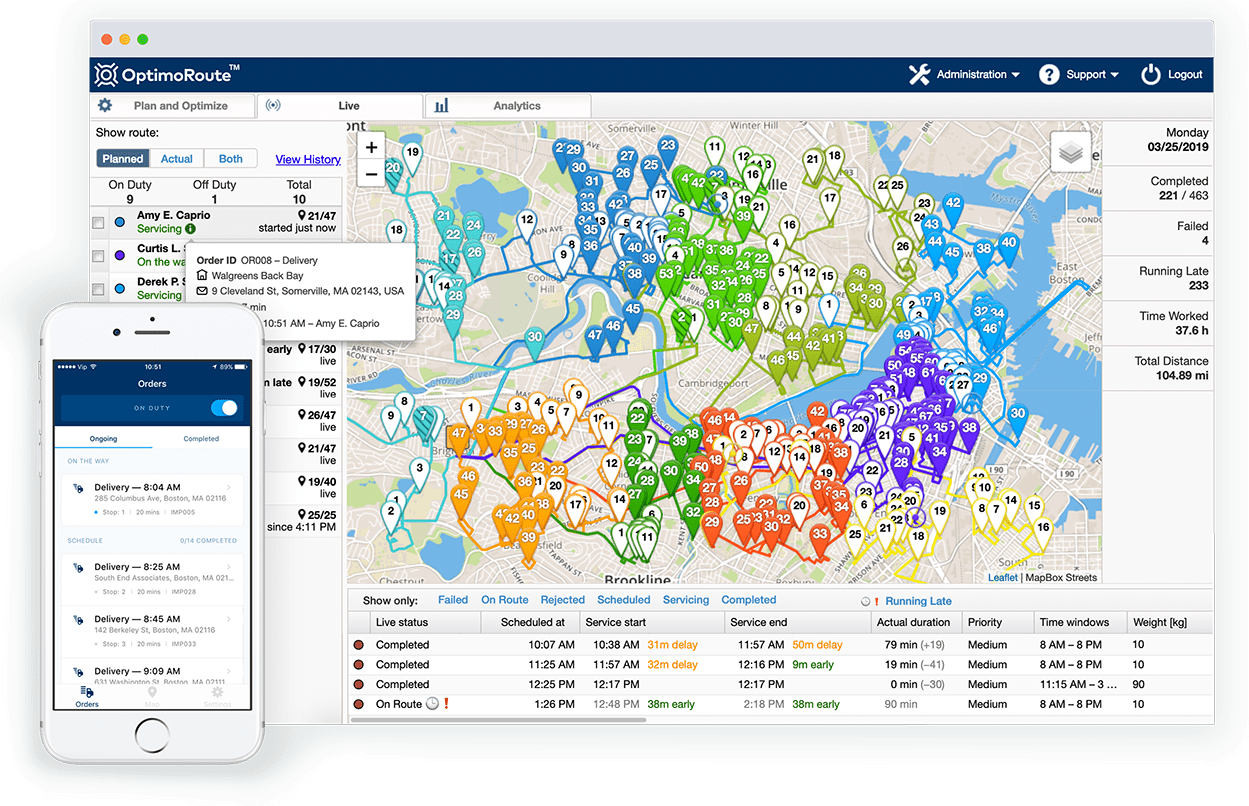
Some platforms provide dashboards showing route progress, completed stops, delays, or outstanding work. This visibility helps managers identify issues sooner and communicate more accurately with customers.
Common Features to Look For
- Route optimization: Organizes stops using selected priorities, such as distance, time, or workload.
- Time-window scheduling: Accounts for appointments, delivery windows, and customer availability.
- Capacity planning: Helps match work to vehicle limits, staff availability, or equipment requirements.
- Dispatch tools: Makes it easier to assign routes and adjust plans when circumstances change.
- Mobile access: Gives drivers or field workers access to schedules, directions, and job information.
- Live updates: May provide current location or route-status information, depending on the system and device setup.
- Reporting: Tracks measures such as completed stops, travel time, and schedule performance.
- Integrations: Connects with tools such as order management, customer relationship management, or fleet systems.
Who Can Benefit?
Route scheduling software can support many types of organizations that send people or vehicles to multiple locations. Common examples include:
- Delivery and courier businesses
- Field service and maintenance teams
- Home health and community care providers
- Sales and inspection teams
- Waste collection and municipal services
- Transportation and logistics companies
The best fit depends on the nature of the work. A small team with a handful of daily appointments may need a simple scheduling tool, while a large fleet may require advanced dispatch, integration, and reporting capabilities.
How to Choose the Right Software
Before comparing products, identify the specific challenges the software needs to solve. Consider the number of daily stops, the size of the team, how often schedules change, and whether appointments have strict time windows. Also determine which systems the software must connect to.
During an evaluation, ask practical questions: Can routes be adjusted easily? Can workers access information on their phones? Does the system support the rules your business follows? Are reports useful and easy to understand? A trial or demonstration can help teams assess how well the product fits real daily workflows.
It is also important to consider ease of use, customer support, data security, and total cost. A feature-rich system may not be the best choice if it is difficult for dispatchers and drivers to use consistently.
Tips for Successful Implementation
- Start with accurate data. Review addresses, appointment windows, service times, and vehicle or staff details before building schedules.
- Set clear priorities. Decide what matters most, such as on-time arrival, shorter travel distances, or balanced workloads.
- Involve the people who will use it. Dispatchers and mobile workers can point out practical needs that may not be obvious during software selection.
- Test with a small group. A limited rollout can reveal workflow issues before the software is introduced across the organization.
- Review results and adjust. Use feedback and reporting to refine schedules, service-time estimates, and operating procedures.
Conclusion
Route scheduling software helps organizations coordinate stops, people, and vehicles in a more structured way. By improving route planning, reducing manual scheduling work, and making updates easier to share, it can support smoother day-to-day operations. The most effective solution is one that fits the organization’s needs, works well for its users, and is built on accurate information.
Everything You Need to Know About Route Scheduling Software: FAQs and Answers
- What is route scheduling software?
- How does route scheduling software work?
- What are the benefits of using route scheduling software?
- Who can benefit from route scheduling software?
- Can route scheduling software optimize routes in real time?
- What features should I look for in route scheduling software?
- How much does route scheduling software cost?
- How do I choose the right route scheduling software for my business?
What is route scheduling software?
Route scheduling software helps businesses plan and organize trips to multiple locations. It uses details such as stop addresses, appointment windows, travel times, and vehicle or staff availability to create practical schedules and routes. Depending on the system, it may also help dispatchers assign work, share updates with drivers, and adjust plans when schedules change.
How does route scheduling software work?
Route scheduling software uses details such as stop locations, appointment windows, service times, vehicle capacity, and staff availability to build an organized daily schedule. It can arrange stops into efficient routes and assign them to drivers or field teams based on your priorities. Many systems also let dispatchers update routes when plans change and share new instructions with workers through a mobile app. Some tools include traffic or location updates to help teams respond to delays and keep schedules on track.
What are the benefits of using route scheduling software?
Route scheduling software helps businesses plan efficient routes, organize appointments, and assign stops to the right drivers or field workers. By considering factors such as travel time, location, and customer time windows, it can reduce unnecessary driving and make schedules more realistic. Many tools also simplify dispatching, make it easier to update routes when plans change, and give teams better visibility into daily progress. These benefits can save planning time, support more reliable service, and help organizations make better use of their people and vehicles.
Who can benefit from route scheduling software?
Route scheduling software can benefit any organization that sends people or vehicles to multiple locations. Delivery and courier services, field service technicians, home health providers, sales teams, inspectors, and municipal crews can use it to organize stops, account for appointment windows, and keep schedules manageable. Whether a business has a small team or a large fleet, the right software can help reduce manual planning and improve coordination between dispatchers and mobile workers.
Can route scheduling software optimize routes in real time?
Yes, many route scheduling software platforms can optimize routes in real time by responding to changing conditions such as traffic, delays, cancellations, and new service requests. Depending on the system, dispatchers may be able to update routes and send revised schedules or directions to drivers through a mobile app. Real-time optimization can help teams make informed adjustments, though available features depend on the software, data sources, and device connectivity.
What features should I look for in route scheduling software?
When choosing route scheduling software, look for route optimization, appointment time-window support, and tools for assigning stops based on driver availability, vehicle capacity, and service requirements. Mobile access can help drivers view schedules, directions, and job details, while real-time updates make it easier to respond to delays or changes. Useful reporting, easy-to-use dispatch controls, and integrations with systems such as order management or customer databases can also streamline daily operations. The right features depend on your team’s size, workflow, and scheduling challenges.
How much does route scheduling software cost?
The cost of route scheduling software varies based on factors such as the number of users or vehicles, the volume of routes, and the features included. Basic plans may be priced for small teams, while larger businesses may need customized plans with advanced optimization, live tracking, integrations, and reporting. Some providers charge a monthly or annual subscription, and others offer pricing based on usage. Compare the total cost, including setup, training, and any add-ons, and ask providers for a quote based on your needs.
How do I choose the right route scheduling software for my business?
Choose route scheduling software by first identifying your business’s needs, such as the number of daily stops, appointment time windows, fleet size, and how often plans change. Look for features that match your workflow, including route optimization, dispatch tools, mobile access, real-time updates, reporting, and integrations with systems you already use. Consider ease of use, customer support, data security, and total cost, and ask relevant team members to test the software through a demo or trial. The right solution should fit your operations, be practical for dispatchers and drivers, and have room to grow with your business.