Handheld GPS for Hiking: A Guide to Choosing and Using One
A handheld GPS can help hikers stay oriented, follow a planned route, and record where they have been. Unlike a smartphone, a dedicated GPS device is designed for outdoor use and often offers physical buttons, a rugged body, and longer battery life. It can be a useful navigation tool on day hikes, backpacking trips, and adventures beyond reliable cell service.
What a Handheld GPS Does
A handheld GPS receiver uses signals from navigation satellites to estimate its location. Depending on the device, it may also show topographic maps, track distance and elevation, save waypoints, and guide you along a route. Many models can record a track as you hike, making it easier to review your trip or retrace your path.
GPS positioning does not require cellular service, but map availability varies. Some devices come with built-in maps, while others require you to download or purchase maps separately. Check what is included before choosing a model.
Key Features to Consider
- Battery life: Compare the expected runtime with the length of your hikes. Some devices use replaceable batteries; others have rechargeable batteries. Carry a backup power source or spare batteries when appropriate.
- Durability and weather resistance: Look for a device designed for outdoor conditions. Water-resistance ratings can help you understand how a device is expected to handle rain or splashes, but they do not mean it is indestructible.
- Screen and controls: A larger screen can make maps easier to read, while physical buttons may be simpler to use with gloves or in wet conditions. Touchscreens can be convenient but may be harder to operate in cold weather.
- Maps and navigation tools: Consider whether the device supports topographic maps, route planning, waypoint marking, and track recording. Confirm whether maps can be used offline.
- Satellite reception: Reception can be affected by terrain, dense trees, and buildings. Devices that support multiple satellite systems may offer more options for receiving signals, depending on conditions.
- Weight and size: A compact device is easier to carry, while a larger model may offer a more readable display. Think about how it will fit into your pack and how often you will use it.
- Additional features: Some models include a compass, altimeter, wireless connectivity, or messaging and emergency communication functions. Features vary, so check the product specifications carefully.
Handheld GPS vs. Smartphone Navigation
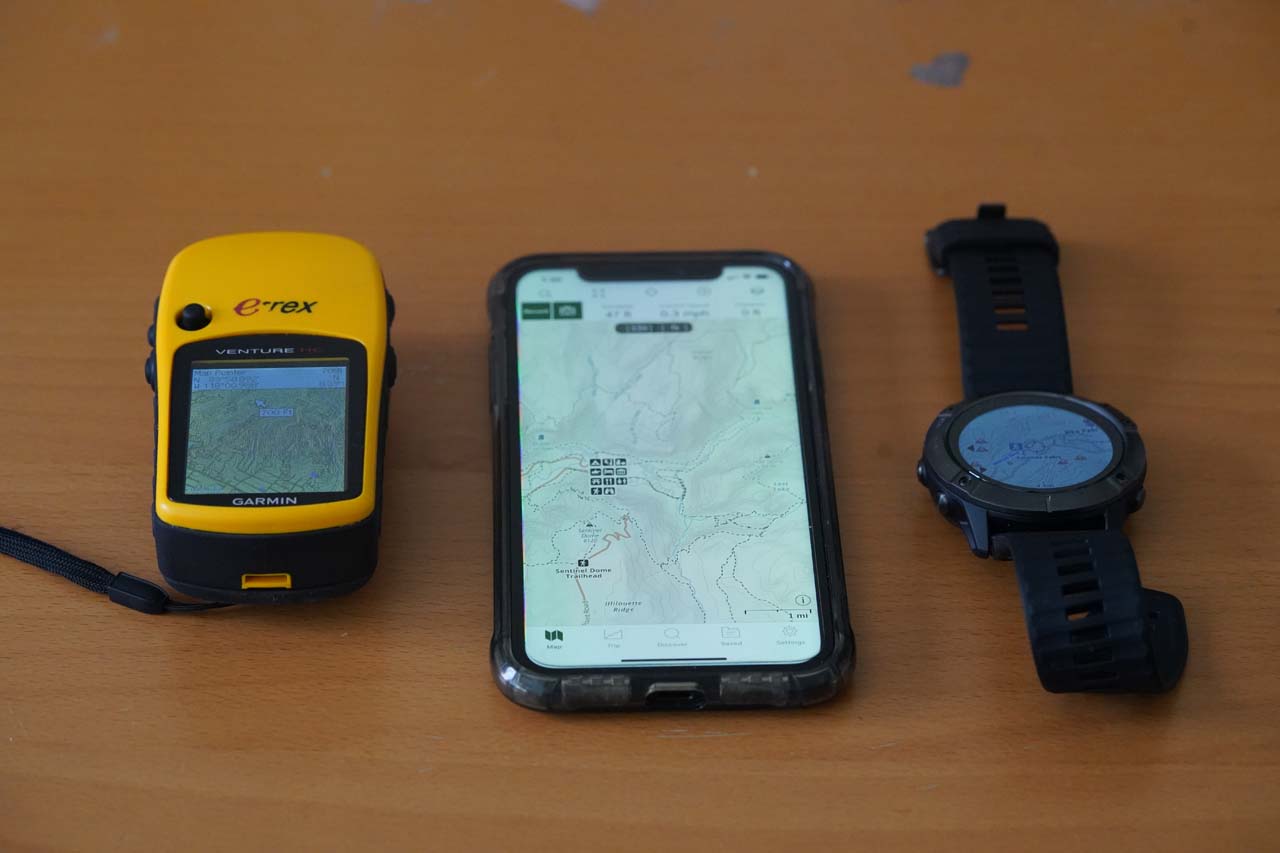
Smartphones can be excellent navigation tools, especially when paired with an offline mapping app and downloaded maps. They are familiar, versatile, and often provide a large, detailed display. However, battery drain, cold temperatures, drops, and moisture can make a phone less dependable as a sole navigation device on a demanding trip.
A handheld GPS is built specifically for navigation and may offer longer battery life, more rugged construction, and controls that work well outdoors. It can also cost more and may require time to learn. Many hikers carry both: a handheld GPS as their primary navigation tool and a phone as a backup or for additional map detail.
How to Use a Handheld GPS on the Trail
- Learn the device before the hike. Practice turning it on, reading the map, saving a waypoint, and following a route at home or on a familiar trail.
- Download maps and routes in advance. Do not assume a map will load without a data connection. Check that the relevant area is available offline.
- Set your coordinate system. If you are using coordinates from a map or another source, make sure the GPS uses the matching format and datum.
- Mark useful waypoints. You may choose to save trailheads, campsites, junctions, water sources, or other important locations.
- Record your track. Track recording can show your progress and help you retrace your route. Review your settings so that recording frequency and battery use suit the trip.
- Check your position regularly. Use the GPS to confirm your location at trail junctions or when the route becomes unclear, rather than waiting until you are lost.
- Conserve power. Reduce screen brightness, use battery-saving settings when available, and turn off features you do not need.
Do Not Rely on GPS Alone
A GPS receiver is a valuable aid, but it is not a substitute for sound preparation. Batteries can run out, devices can be damaged, and satellite reception may be limited in some terrain. Carry a paper map and compass, know how to use them, and bring enough food, water, clothing, and emergency supplies for the conditions.
Before setting out, check the weather, trail conditions, and local guidance. Share your itinerary with someone you trust, and understand the limits of any emergency features included with your device. A GPS can support good decisions, but it cannot make them for you.
Choosing the Right Device
The best handheld GPS for hiking depends on where and how you hike. For occasional day hikes, a straightforward model with dependable positioning and clear maps may be enough. For remote trips, longer battery life, robust mapping options, and additional communication features may be worth considering. Compare the total cost of the device, maps, accessories, and any required service plans.
With the right device, a little practice, and a reliable backup plan, a handheld GPS can make trail navigation more organized and help you travel with greater confidence.
9 Essential FAQs About Using Handheld GPS Devices for Hiking
- What is a handheld GPS, and how does it help with hiking?
- Do handheld GPS devices work without cell service?
- What features should I look for in a handheld GPS for hiking?
- How accurate are handheld GPS devices on hiking trails?
- How long does a handheld GPS battery last?
- Can I download maps to a handheld GPS for offline use?
- Is a handheld GPS better than using a smartphone for hiking?
- How do I use a handheld GPS to follow a hiking route or retrace my steps?
- Should I carry a map and compass in addition to a handheld GPS?
What is a handheld GPS, and how does it help with hiking?
A handheld GPS is a portable navigation device that uses signals from satellites to estimate your location, even when you don’t have cell service. On a hike, it can show your position on a map, help you follow a planned route, mark important spots such as trail junctions or campsites, and record your track so you can retrace your steps. It’s a helpful navigation aid, but it’s still wise to carry a paper map and compass and know how to use them.
Do handheld GPS devices work without cell service?
Yes. Handheld GPS devices receive location signals directly from satellites, so they can determine your position without cell service. For navigation, however, you’ll need maps and routes saved on the device ahead of time; features such as live weather, online map downloads, or messaging may require cellular coverage, Wi-Fi, or a separate satellite service. For hiking, download maps before you leave and carry a paper map and compass as backups.
What features should I look for in a handheld GPS for hiking?
When choosing a handheld GPS for hiking, look for long battery life, a rugged and weather-resistant design, and a screen that’s easy to read in bright sunlight. Preloaded or downloadable topographic maps, offline navigation, waypoint marking, and track recording can make it easier to plan and follow routes. Physical buttons are useful when wearing gloves or in wet conditions, while a built-in compass and barometric altimeter can help with orientation and elevation readings. Also consider the device’s weight, satellite compatibility, and whether it supports replaceable batteries or emergency communication features.
How accurate are handheld GPS devices on hiking trails?
Handheld GPS devices are often accurate to within about 10 to 30 feet (3 to 9 meters) under open skies, but accuracy can vary with satellite reception, terrain, weather, and the device itself. Dense trees, steep canyons, and nearby cliffs or buildings may weaken or reflect signals, making your displayed position less precise. For safer navigation, treat GPS as a helpful guide rather than an exact measure, check your location against the trail and map, and carry a paper map and compass as backups.
How long does a handheld GPS battery last?
A handheld GPS battery can last anywhere from about 10 hours to several days, depending on the model, battery type, screen brightness, tracking settings, temperature, and how often you use features such as Bluetooth or satellite messaging. Cold weather can shorten battery life, while dimming the screen and using power-saving modes can help extend it. Check the manufacturer’s estimated runtime, and bring spare batteries or a charged power bank for longer hikes.
Can I download maps to a handheld GPS for offline use?
Yes, many handheld GPS devices let you download maps for offline use, so you can view them without cell service. Map options vary by model: some devices include preloaded maps, while others require you to download or purchase compatible maps and transfer them to the device or a memory card. Before your hike, confirm that the map covers your route and is saved on the device, then test it with wireless data turned off.
Is a handheld GPS better than using a smartphone for hiking?
A handheld GPS can be a better choice for challenging or remote hikes because it’s built for outdoor use and often offers rugged construction, physical buttons, and longer battery life. A smartphone can be convenient and provide detailed maps, but its battery may drain quickly, and it can be more vulnerable to drops, moisture, and cold. For many hikers, the best option is to carry both: use a handheld GPS as a primary navigation tool and keep a phone with offline maps as a backup. Neither replaces a paper map, compass, and the skills to use them.
How do I use a handheld GPS to follow a hiking route or retrace my steps?
To follow a hiking route, download or create it in your GPS device before you leave, then select the route and choose the device’s navigation or “follow” option. Check the map and direction prompts at trail junctions, and periodically confirm that your location matches the planned route. To retrace your steps, turn on track recording before you start hiking; when you’re ready to return, open the saved track and choose an option such as “TracBack,” “Reverse,” or “Navigate to Start”—the wording varies by device. Practice these features beforehand, and carry a paper map and compass as backup in case the GPS loses power or stops working.
Should I carry a map and compass in addition to a handheld GPS?
Yes. A paper map and compass are valuable backups because a handheld GPS can run out of battery, become damaged, or lose satellite reception. Learn how to use them before your hike, and make sure your map covers the area and matches your route. A GPS is a helpful navigation tool, but it’s best not to rely on it as your only way to find your location.